

IRS Form 941, also known as the Employer’s Quarterly Federal Tax Return, is a critical tax form that startups use to report payroll taxes to the Internal Revenue Service (IRS). This form is filed quarterly and details the income taxes withheld from employees’ paychecks, as well as both the employer and employee portions of Social Security and Medicare taxes.
Very small companies, with less than $1,000 in employment tax liability, may use Form 944. Most startups, however, quickly grow large enough to use Form 941.
Visit our guide to Startup Tax Forms to find out more information about other IRS forms startups need.
Summarizing the taxes withheld from employees
For startups, Form 941 acts as a comprehensive summary of the company’s quarterly payroll activities. It allows the startup to report the number of employees, total wages paid, and the amount of federal income tax, Social Security tax, and Medicare tax withheld from employees’ paychecks during the quarter.
Form 941 also lets the company calculate the employer’s share of Social Security and Medicare taxes for the quarter, including any adjustments or corrections from previous quarters. Importantly, it serves as a reconciliation tool to ensure that the total tax liability matches the total taxes deposited throughout the quarter.
When is Form 941 due?
Startups must file Form 941 by the last day of the month that follows the end of the quarter. For example, the first quarter’s Form 941 is due by April 30th. Check our tax calendars for all the due dates. Timely and accurate filing of Form 941 is crucial to avoid penalties and maintain compliance with IRS regulations.
To complete Form 941, your company needs to maintain meticulous payroll records, accurately calculate the appropriate taxes, and stay informed about any updates or changes to employment tax requirements. You can use specialized payroll software, or you can work with a professional accounting firm like Kruze Consulting to handle the process and ensure compliance with IRS regulations.
Step-by-step instructions: IRS Form 941
IRS Form 941 is the Employer’s Quarterly Federal Tax Return. It’s used by employers to report income taxes, Social Security tax, and Medicare tax withheld from employee’s wages, as well as the employer’s portion of Social Security and Medicare taxes. IRS forms are complicated and we strongly recommend you work with an experienced startup CPA.
Here are step-by-step Form 941 instructions for your startup.
Step 1: Gather necessary information
Before you begin filling out Form 941, make sure you have the following information ready:
-
Employer Identification Number (EIN): This is your business’s unique tax identification number.
-
Business name and address.
-
Payroll information for the quarter: including total wages paid, federal income tax withheld, and amounts withheld for Social Security and Medicare.
-
Deposit records: any deposits you’ve made for employment taxes throughout the quarter.
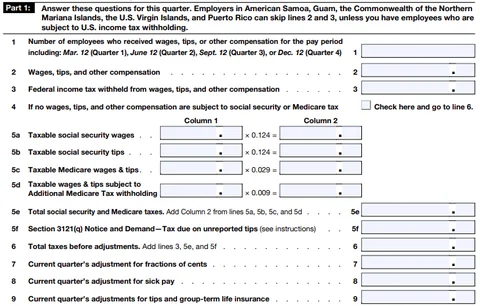
Step 2: Answer these questions for this quarter
Make sure you’ve downloaded the current version of the form and the Form 941 instructions from the IRS web site.
-
Enter the number of employees who received wages for the pay period including March 12, June 12, September 12, or December 12 (line 1).
-
Enter total wages, tips, and other compensation paid this quarter (line 2).
-
Enter the total federal income tax withheld from wages, tips, and other compensation (line 3).
-
If no wages were subject to social security or Medicare tax, check the box on line 4.
-
Enter taxable social security and Medicare wages and tips (lines 5a-5d).
-
Calculate total taxes before adjustments (line 6).
-
Make any necessary current quarter adjustments (lines 7-9).
Step 3: Fill in tax adjustments
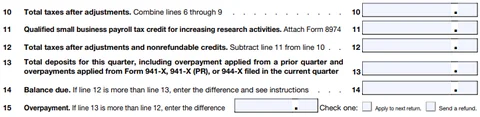
- Complete the remaining calculations as directed on the form.
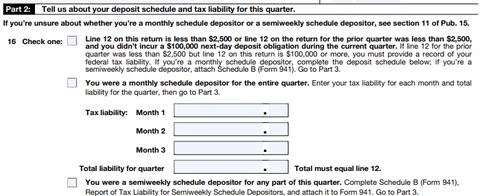
Step 4: Fill in tax liability and deposits
-
Determine if you’re a monthly or semiweekly schedule depositor.
-
If monthly, enter your tax liability for each month of the quarter on line 16.
-
If semiweekly, check the appropriate box and complete Schedule B (Form 941).
Step 5: Tell us about your business

-
If your business has closed or you stopped paying wages, check box 17 and enter the final date you paid wages.
-
If you’re a seasonal employer, check box 18.
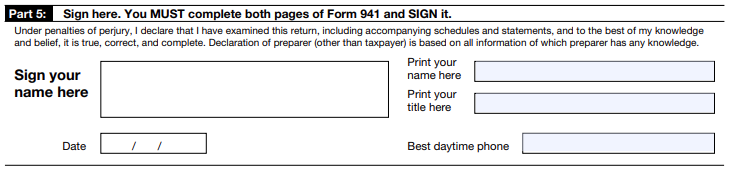
Step 6: Fill in signature
-
Authorized signatory. The form must be signed by an authorized person (typically an officer of the company, such as the CEO or CFO). If you’re a startup, this might be the founder or financial officer.
-
Date and contact information. Include the date, your job title, and a contact phone number.
Step 7: Review and file the form
-
Review the form. Double-check all amounts and calculations to ensure accuracy. Mistakes could lead to penalties or delays in processing.
-
File electronically or by mail. You can file Form 941 electronically through the IRS-approved e-file providers, or you can mail the form to the IRS. The mailing address depends on your location and whether you’re including a payment.
Step 8: Make the payment (if required)
If you have a balance due, ensure that the payment is made by the due date to avoid penalties. Payments can be made using the IRS Electronic Federal Tax Payment System (EFTPS), or by mailing a check or money order with your Form 941-V payment voucher.
Important deadlines
Form 941 is due on the last day of the month following the end of each quarter:
-
Q1 (January–March): Due by April 30
-
Q2 (April–June): Due by July 31
-
Q3 (July–September): Due by October 31
-
Q4 (October–December): Due by January 31
Remember, it’s important to complete these forms accurately and submit them by the appropriate deadline. We recommend you consult a tax professional with experience in startup accounting to make sure you’re in compliance.


