

IRS Form 944, also known as the Employer’s Annual Federal Tax Return, is a tax form designed for certain small employers that have been notified by the IRS to file this form annually instead of filing Form 941 quarterly. This form is specifically intended for small businesses and startups that have relatively low annual payroll tax liabilities. Typically, their annual liability for federal income taxes, Social Security, and Medicare is less than $1,000. Larger companies with greater tax liability use Form 941.
What does Form 944 include?
For startups that meet the eligibility criteria for filing Form 944, it serves as an annual summary of the company’s payroll tax activities. If you want to learn more, visit our article on typical startup payroll costs. This form allows the company to report the total wages paid to employees, the federal income tax withheld from employees’ paychecks, and the employer and employee portions of Social Security and Medicare taxes.
Form 944 also facilitates the calculation of the employer’s share of Social Security and Medicare taxes for the entire year, along with any adjustments or corrections that need to be made. It serves as a reconciliation tool to ensure that the total tax liability matches the total taxes deposited throughout the year.
When is Form 944 due?
Startups must file Form 944 by January 31st of the following year (see our tax calendars). Filing Form 944 annually simplifies the tax reporting process for eligible small businesses, since they don’t need to file Form 941 quarterly.
To accurately complete Form 944, startups should maintain accurate payroll records, ensure proper tax calculations, and stay informed about any updates or changes to employment tax requirements. Specialized payroll software can help streamline the process and ensure compliance with IRS regulations, or startups can contact us for professional assistance.
Step-by-step instructions: Form 944
IRS Form 944, Employer’s Annual Federal Tax Return, is used by small employers (typically those with an annual tax liability of $1,000 or less for Social Security, Medicare, and federal income taxes withheld) to report and pay federal employment taxes annually, rather than quarterly (as is done with Form 941).
Here’s are step-by-step IRS Form 944 instructions.
Step 1: Confirm Eligibility to File Form 944
- Only employers authorized by the IRS can file Form 944. The IRS will notify you if you are eligible, and your startup must receive written notice from the IRS to file this form, even if you estimate your tax liability as less than $1,000. You can also request to file Form 944 instead of Form 941 by contacting the IRS.
Step 2: Download the Form
-
Visit the IRS website and download Form 944 for the correct tax year, and download the Form 944 instructions.
-
Make sure you’re using the correct version for the tax year you’re filing.
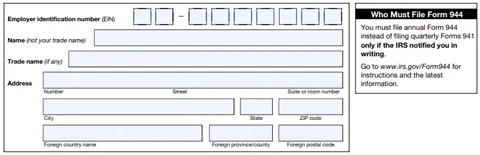
Step 3: Complete the Header Section
-
Employer Identification Number (EIN): Enter your startup’s EIN, which you received from the IRS when registering your business.
-
Name: Enter the legal name of your startup.
-
Trade Name: If your startup operates under a trade name (DBA), enter that name; otherwise, leave this blank.
-
Address: Enter your company’s address, including city, state, and ZIP code.
-
Calendar Year: Verify that you are filing for the correct year (e.g., 2023, 2024).
**Step 4: Fill Out Part 1 - Federal Employment Tax
Liability**
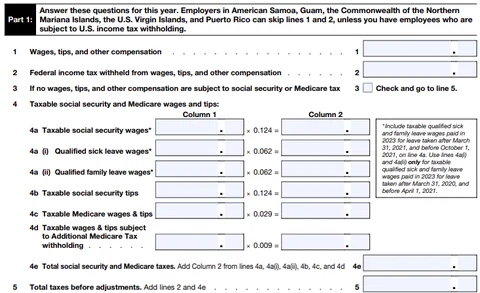
This section covers the total wages and tips your startup paid to employees and the corresponding taxes.
-
Line 1 - Wages, Tips, and Other Compensation: Enter the total wages and tips paid to employees during the year (before taxes).
-
Line 2 - Federal Income Tax Withheld: Enter the total amount of federal income tax withheld from employees’ wages and tips.
-
Line 3 - If no wages, tips, or other compensation are subject to Social Security or Medicare tax, check this box and skip to line 5.
-
Social Security and Medicare Taxes:
-
Line 4a through 4e: Report taxable Social Security and Medicare wages and tips.

-
Line 4a through 4e: Report taxable Social Security and Medicare wages and tips.
-
Line 5 - Total Taxes Before Adjustments: Add lines 2 and 4e. This is the total tax before any adjustments.
-
Line 6 - Current Year’s Adjustments: Make any corrections to tax amounts for the year (e.g., for sick pay, fractions of cents, or other minor corrections).
-
Line 7 - Total Taxes After Adjustments: Add or subtract the adjustments from Line 5 to get your total annual tax liability.
-
Line 8a through 8g - Qualified Small Business Payroll Tax Credit: If you claimed an R&D payroll tax credit using Form 8974, enter the credit amount here. Otherwise, leave this blank.
-
Line 9 - Total Taxes After Credit: Subtract any credits (if applicable) from Line 7.
-
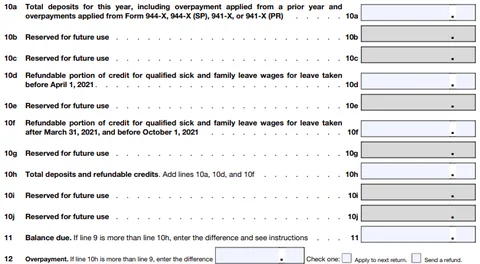
Lines 10a through 10j - Total Deposits and Refundable Credits. Enter all tax deposits for the year and any refundable credits.
-
Line 11 - Balance Due. If line 9 is more than line 10, enter the amount due on this line.
- Line 12 - Overpayment. If you paid too much in tax for the year, enter the amount that you overpaid.
**Step 5: Fill Out Part 2 - Deposits and tax liability for
the year**
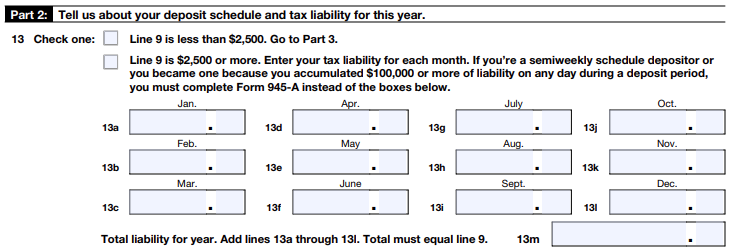
Line 13: Determine if you’re a monthly or semiweekly schedule depositor.
-
If monthly, enter your tax liability for each month of the year.
-
If semiweekly, check the appropriate box and complete Schedule B (Form 941).
**Step 6: Fill Out Part 3 - Tell us about your business
(only if applicable)**
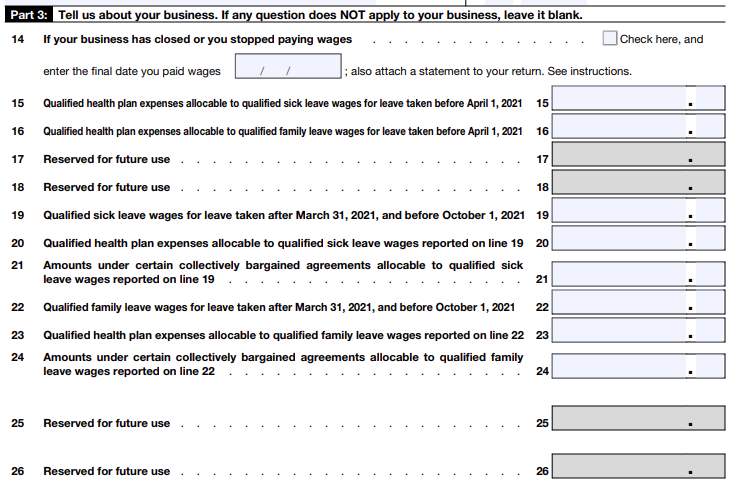
- Part 3 only needs to be completed if your business has closed or you no longer pay wages.
Step 7: Fill Out Part 4 - Third-party designee

- If you want to allow someone else (like an accountant or tax preparer) to speak to the IRS on your behalf, check “Yes” and provide their name, phone number, and personal identification number (PIN). If not, check “No.”
Step 8: Fill Out Part 5 - Signature

-
The business owner or an authorized representative must sign and date the form.
-
Provide the title (e.g., CEO, CFO) and the best phone number to reach you.
Step 9: Review and Submit Form 944
-
Review: Double-check all entries for accuracy.
-
Submit:
- If you’re filing electronically, use IRS-approved e-file software.
- If you’re filing by mail, send the completed Form 944 to the appropriate IRS address based on your business’s location. Refer to the IRS Form 944 instructions for where to mail the form.
Step 10: Pay Any Taxes Due
-
If you have a balance due (Line 11), ensure you pay by the filing deadline (usually January 31 of the following year).
-
Payment can be made via the Electronic Federal Tax Payment System (EFTPS), or by check/money order if filing by mail.
Tips for Filing Form 944:
-
Deposit schedule. Make sure all tax deposits are made on time, even if you only file once a year.
-
Keep records. Maintain records of payroll, deposits, and communications with the IRS for at least four years.
-
Consult a tax professional. If you’re unsure about your liability or eligible credits, seek advice from a qualified tax expert.


